


Search Results for 'script'
-
Search Results
-
Topic: setIfEmpty Script
This is a script that will only set a field value if it is currently set to an empty value or is set to a specified default value. This is useful for blindly setting a value on a field without having to do the check work yourself.
If you use my ‘Script Manager’ form, I call this one ‘setIfEmpty’ and you load it as:
document.getFormNamed('Script Manager').runScriptNamed('setIfEmpty');// ========== setIfEmpty Start ========== // // NAME: setIfEmpty // VERSION: 1.0 /** * Set a field if it is currently empty or matches the default value. * * target: The record to use (TFFormEntry object) * fieldId: The field ID (e.g. <code>fld-hash</code>) to set. * value: The value to set in the field. * defaultValue: The default value of the field. * * return: boolean true if set or boolean false if unset. */ function setIfEmpty(target, fieldId, value, defaultValue) { var current = target.getFieldValue(fieldId); if ((!current || current == defaultValue) && current != value) { console.log('setIfEmpty passed for ' + fieldId + ', setting to: ' + value); target.setFieldValue(fieldId, value); return true; } else { console.log('setIfEmpty failed for ' + fieldId + ', skipping.'); return false; } } // ========== setIfEmpty End ========== //Simple example of how to use it:
setIfEmpty(record, 'fld-39ca9564ef2347ac93f933bc9a2316ac', result.fields.title, null);
setIfEmpty(record, 'fld-39379cdff743496f9a1ccbdc1ae56297', result.fields.quantity, 1);
The first has a default of null (TapForms’ default default value) and the second has a default of 1 which obviously is a configured value for a number field.
Topic: Currency Conversion Function
Every so often I buy something that isn’t directly in USD and want to have a quick way of converting it back to USD. I ended up using a free currency converter API which requires a simple registration to get an API key (replace the string
PUT_YOUR_API_KEY_HEREwith the API key they assign you). Apart from that it has a reasonably generous amount of requests (100 an hour).Here’s the script, intended to be saved as a form script named ‘Currency Converter’ in a form named ‘Script Manager’ similar to the logger module:
// ========== convertCurrency Start ========== //
// NAME: Convert Currency
// VERSION: 1.1
// CHANGES:
//  1.1: Add options for different API, update to v7.

document.getFormNamed('Script Manager').runScriptNamed('Logger');

/**
 * Convert from one currency to another using a free web serive.
 *
 * source_currency: 		The source currency to convert from (e.g. CAD).
 * destination_currency:	The destination currency to convert into (e.g. USD).
 * amount:					The amount in the source currency to convert into destination currency.
 *
 * return: float value of converted currecny or false on error.
 */
function convertCurrency(source_currency, destination_currency, amount)
{
	var services = { "free" : "https://free.currconv.com",
						"prepaid": "https://prepaid.currconv.com",
						"premium": "https://api.currconv.com"
					};

	var apiKey = 'PUT_YOUR_API_KEY_HERE';
	var currency_key = source_currency + "_" + destination_currency;
	var url = `${services['free']}/api/v7/convert?compact=ultra&apiKey=${apiKey}&q=${currency_key}`;

	logger.logMessage(`Requesting from URL: ${url}`);

	// Make the request.
	var forex = Utils.getJsonFromUrl(url);

	// Check the response matches.
	if (forex && forex[currency_key])
	{
		logger.logMessage(`Conversion for ${source_currency} to ${destination_currency} is ${forex[currency_key]}`);
		return forex[currency_key] * amount;
	}
	else
	{
		logger.logMessage("Unknown response received from URL: " + JSON.stringify(forex));
		return false;
	}
}
// ========== convertCurrency End ========== //
That one is simple: put in the currency you start with and the currency you want to land in and the amount. The API could do the amount calculation itself but I find it interesting to see what the raw value is and handle the multiplication in my own code.
In my case this is then connected to a field script that looks at a total field and a currency field to populate a USD total field. It’s a little more complicated because I do some math to get the total (shipping fee, taxes and total cost).
Simple example:
document.getFormNamed('Script Manager').runScriptNamed('Currency Converter'); convertCurrency('CAD', 'USD', '123.45');Topic: Automobile VIN Lookup Script
Yesterday I wrote a script for a customer that looks up vehicle information when given a VIN. It was originally based upon the movie details lookup script I wrote that’s in the Scripting topic of the online user manual.
You would of course use your own field IDs for your own form, but I’ll also attach a .tff file that has this script built-in to it that you can import into your own database documents.
var make_id = 'fld-e0d7613414694a53b9988e99ae238b75'; var model_id = 'fld-d7cc5f3b431e4e7ba1183597e2823606'; var year_id = 'fld-20634b8ce9a747e69c6522c07e95da8b'; var vin_id = 'fld-73b7977d2c9f40e399e3fe138e63fa2e'; function fetchVINData() { var vin = record.getFieldValue(vin_id); console.log(vin); var url = 'https://vpic.nhtsa.dot.gov/api/vehicles/decodevinvaluesextended/' + vin + '?format=json'; var vin_data = Utils.getJsonFromUrl(url); return vin_data; } var vin_data = fetchVINData(); var results = vin_data['Results']; if (results && results.length > 0) { var vehicle_data = results[0]; var make = vehicle_data['Make']; var model = vehicle_data['Model']; var year = vehicle_data['ModelYear']; record.setFieldValue(make_id, make); record.setFieldValue(model_id, model); record.setFieldValue(year_id, year); form.saveAllChanges(); }When I moved the shipment tracking numbers out of the “Orders” form into their own dedicated form called “Shipments”, I ran into a problem: using TapForms’ built in barcode scanner would return the shipment record not the order record. To work around this, I use a script field to aggregate all of the tracking numbers together into the “Orders” record in a field creatively named “Aggregate Shipping Tracking Numbers”.
This script iterates through child records and is based on the “child records loop” snippet that comes out of the box with TapForms. It uses the logger for fencing the output so that it’s easy to track down.
It returns a space concatenated result and if you look in your console, you’ll see output like this:
==================================================================
Start "Aggregate Shipping Tracking Numbers (Orders)" script execution at Sun Jul 21 2019 10:45:41 GMT-0700 (PDT)
==================================================================

Sun Jul 21 2019 10:45:41 GMT-0700 (PDT)	Adding tracking number: EN012345678JP
Sun Jul 21 2019 10:45:41 GMT-0700 (PDT)	Combined tracking numbers: EN012345678JP

==================================================================
End "Aggregate Shipping Tracking Numbers (Orders)" script execution at Sun Jul 21 2019 10:45:41 GMT-0700 (PDT)
==================================================================
Here’s the script, you’ll need the logger module I’ve mentioned previously.
document.getFormNamed('Script Manager').runScriptNamed('Logger'); function recordsLoop() { var retval = []; var shipments = record.getFieldValue('fld-db2fcdb4d79c466ea09671c47d2ae645'); for (var index = 0, count = shipments.length; index < count; index++){ var tracking_number = shipments[index].getFieldValue('fld-7a29242731d9451092c92d8586dbc94a'); logger.logMessage(<code>Adding tracking number: ${tracking_number}</code>); if (tracking_number) { retval.push(tracking_number); } } return retval.join(' '); } logger.consoleHeader('Aggregate Shipping Tracking Numbers', 'Orders'); result = recordsLoop(); logger.logMessage('Combined tracking numbers: ' + result); logger.consoleFooter('Aggregate Shipping Tracking Numbers', 'Orders'); result;Topic: Logger Module
As I’ve built field scripts, one of the challenges ended up being figuring out which field is running at which time when you have multiple fields and potentially multiple forms. Below is a logger module that I use to help me keep track with timestamps and headers. You can import this script and a few others by using my “Script Manager” form.
Here’s a sample output showing re-entrant behaviour (the script field triggered itself to run):
==================================================================
Start "Shipping/Delivery Autopropagate (Orders)" script execution at Sun Jul 21 2019 10:22:46 GMT-0700 (PDT)
==================================================================

Sun Jul 21 2019 10:22:46 GMT-0700 (PDT)	One shipment detected, validating shipment data
Sun Jul 21 2019 10:22:46 GMT-0700 (PDT)	shipping date set in shipment but not in order, updating order
==================================================================
Start "Shipping/Delivery Autopropagate (Orders)" script execution at Sun Jul 21 2019 10:22:46 GMT-0700 (PDT)
==================================================================

Sun Jul 21 2019 10:22:46 GMT-0700 (PDT)	One shipment detected, validating shipment data

==================================================================
End "Shipping/Delivery Autopropagate (Orders)" script execution at Sun Jul 21 2019 10:22:46 GMT-0700 (PDT)
==================================================================

==================================================================
End "Shipping/Delivery Autopropagate (Orders)" script execution at Sun Jul 21 2019 10:22:46 GMT-0700 (PDT)
==================================================================
Screenshot with less wrapping:

There are two parts that I find useful, the first is the separators which look like this:
logger.consoleHeader('Shipping/Delivery Autopropagate', 'Orders');
var result = propagateDates();
logger.consoleFooter('Shipping/Delivery Autopropagate', Orders');
result;
This creates the header and footer lines in the format you see in the example above. The other part is the
loggerlines:logger.logMessage("One shipment detected, validating shipment data");This then adds the timestamp and also stores the log messages temporarily.
Because I don’t want to copy and paste this all of the time, I have a form called “Script Manager” where I create form scripts that I put in like this (creatively called “Logger”). This means that I can import this with a single line when I want to use it:
document.getFormNamed('Script Manager').runScriptNamed('Logger');Here’s the module:
{ // ========== Logger Start ========== // // NAME: Logger // VERSION: 1.0.2 /** * Logger module provides some extra utility functions for logging data. * This adds some useful functions for integrating with the console and * for building script fields. */ if (logger == undefined) var logger = (function() { var logdata = ""; return { /** * Log a message * * Takes a <code>message</code> and adds it to the internal <code>logdata</code> variable * and also logs it to the console with a timestamp. */ logMessage: function(message) { logdata += message + "\r\n"; console.log(new Date() + '\t' + message) }, /** * Log an error * * Takes a <code>message</code> and <code>error</code> object and then formats into an error * via <code>logMessage</code>. */ logError: function(error) { this.logMessage(<code>Caught error: "${error}" at ${error.line}, ${error.column}</code>); }, /** * Get the internal log buffer * * Returns the raw log buffer to output elsewhere. */ getLog: function() { return logdata; }, /** * Clear the internal log buffer * * Resets the buffer to an empty string. */ clearLog: function() { logdata = ""; }, /** * Utility function to print a header when the script starts with optional form name */ consoleHeader: function(scriptName, formName = "") { var label = scriptName + (formName ? <code>(${formName})</code> : ''); console.log('=================================================================='); console.log('Start "' + label + '" script execution at ' + new Date()); console.log('==================================================================\n'); }, /** * Utility function to print a footer when the script ends with optional form name */ consoleFooter: function(scriptName, formName = "") { var label = scriptName + (formName ? <code>(${formName})</code> : ''); console.log('\n=================================================================='); console.log('End "' + label + '" script execution at ' + new Date()); console.log('==================================================================\n'); } } })(); } // ========== Logger End ========== //I have a form called “Order” where I store stuff I order online. It has a child record called “Shipments” which store shipments. I often want to quickly add a new shipping record and use this as a form script with the prompter to add in a new shipment record with the tracking ID and carrier set. It also will set the shipping date based on the order record if it’s already set or default it to the current date.
This uses the prompter for user interaction (including leveraging a pick list) and
addNewRecordToFieldfor adding a new record to a Link to Form field. It also demonstrates usingsetFieldValuesto bulk set values and also usesJSON.stringifyto dump out debugging information withconsole.log. Here’s a screenshot of the prompter: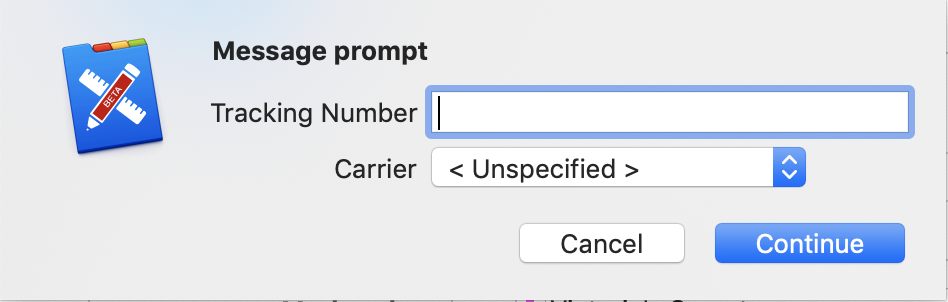
Field names are at the top, replace with ID’s matching your fields.
// Order: Shipment Field ID var shipments_id = 'fld-db2fcdb4d79c466ea09671c47d2ae645'; // Order: Ship Date var ship_date_id = 'fld-6ab700ccc11d418fbd27d8899d00c7a9'; var ship_date = record.getFieldValue(ship_date_id); // Shipments: Record Field ID's var tracking_number_id = 'fld-c487390743c947969cbe661cff596855'; var carrier_id = 'fld-0950c430cb0c41f79c51d43a544b366b'; var shipping_date_id = 'fld-1aa32f17e059424fb4e24bf894b34fdf'; var callbackFunction = function() { if (tracking_number && carrier) { var data = { [tracking_number_id]: tracking_number, [carrier_id]: carrier, }; if (ship_date) { data[shipping_date_id] = ship_date; } else { data[shipping_date_id] = new Date(); } console.log(JSON.stringify(data)); var shipmentRecord = record.addNewRecordToField(shipments_id); shipmentRecord.setFieldValues(data); document.saveAllChanges(); } }; let prompter = Prompter.new(); prompter.addParameter('Tracking Number', 'tracking_number', 'text') .addParameter('Carrier', 'carrier', 'picklist', 'Carrier - Shipments') .show('Message prompt', callbackFunction);Hey Everyone,
It was suggested to me that it would be a good idea to have a separate Scripting forum on my website.
Well, here it is.
This is the place to be if you want to post useful scripts to make Tap Forms do things you never thought possible.
If you’re unfamiliar with scripting in Tap Forms, please see the Scripting topics in the online user manual here:
https://www.tapforms.com/help-mac/5.3/en/topic/scripts
and the Tap Forms specific JavaScript API docs are here. These are the functions you can call within a Tap Forms script that do things specific to Tap Forms, such as fetching a set of records, reading field values, setting field values, and updating the database.
https://www.tapforms.com/help-mac/5.3/en/topic/javascript-api
It’ll be great to see what kinds of scripts you can come up with to make Tap Forms more powerful than ever.
Thanks!
Brendan
Forum: Script Talk
The place to be if you want to talk about Scripting in Tap Forms 5.


